Stats & Limits
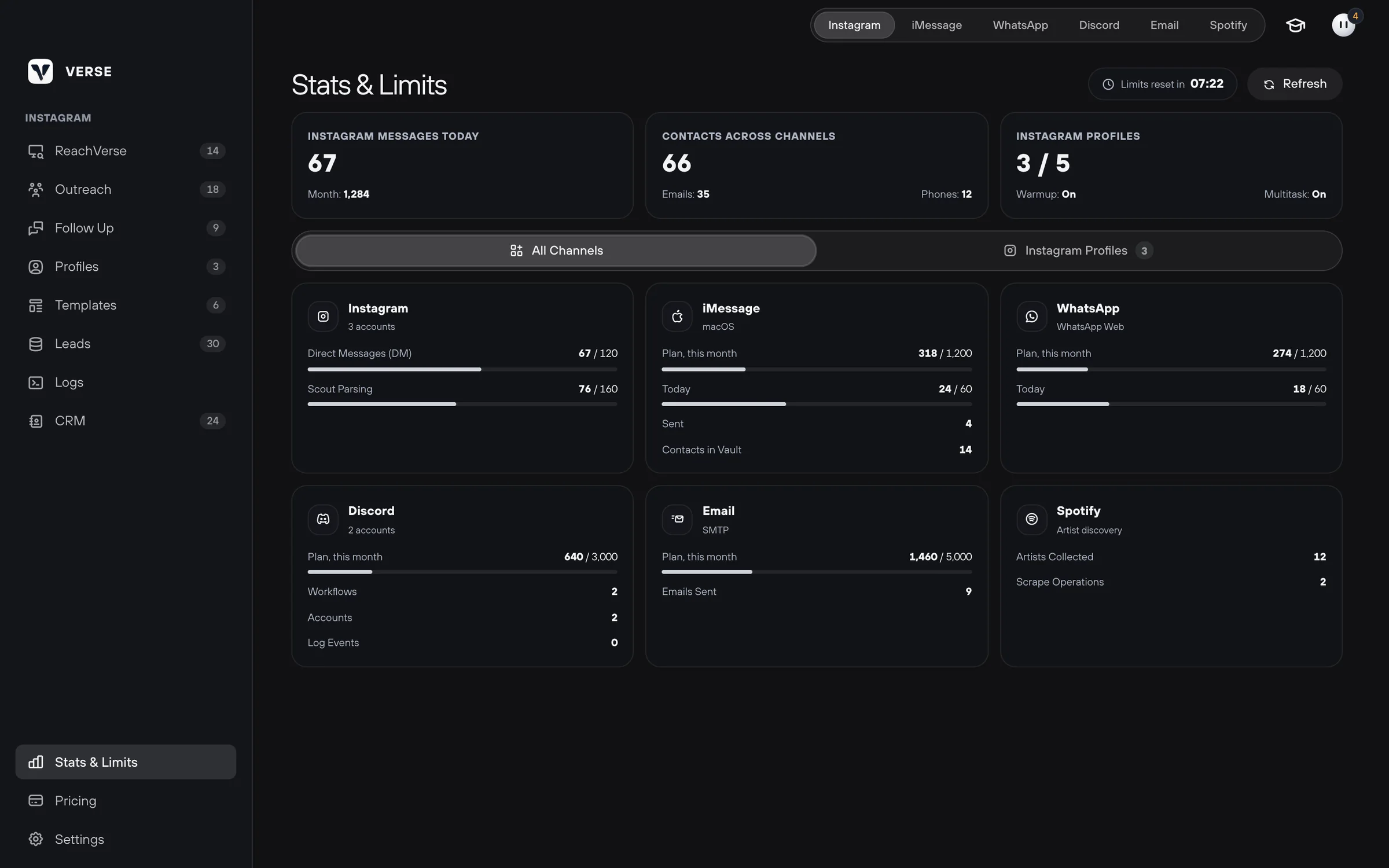
How to read the Stats & Limits screen: how many messages you sent today and this month, how many you can still send, and when the counters go back to zero.
- Updated
- October 17, 2026
- Reading time
- 4 min read
- Platforms
- macOSWindows
The Stats & Limits screen shows how much you sent and collected in all channels. It also shows how much your plan has left. A limit is how much you can send per day or per month. For example, 40 messages a day from one account.
Open this screen before a big mass message. Check it at the end of the day too. This way you see an account that is close to its limit.
To open the screen, click Stats & Limits at the bottom of the menu on the left. The button is in every section. To update the numbers, click Refresh.
How limits are counted
| Limit | How it works |
|---|---|
| Daily | Counted for each profile on its own. A profile is your Instagram account in Verse. It goes back to zero at midnight your time. The Limits reset in timer shows how long until then |
| Monthly | One for the whole plan. All profiles count together |
An example for the Basic plan. Each of the three profiles can send 40 messages a day. But all of them together can send 2,500 a month.
When a limit runs out, sending pauses. The work done so far is saved. All limits by plan are in Safe sending settings.
Main numbers

| Card | What it shows |
|---|---|
| Instagram messages today | How many Instagram messages went out today. Below: the total for this month |
| Contacts across channels | How many contacts you collected. You also see how many have an email or a phone number |
| Instagram Profiles | How many profiles you added and how many your plan allows. Below: Warmup and Multitask. Multitask shows if your plan lets you run several accounts at the same time |
Warm-up means you use a new account by hand for the first 48 hours.
All Channels tab
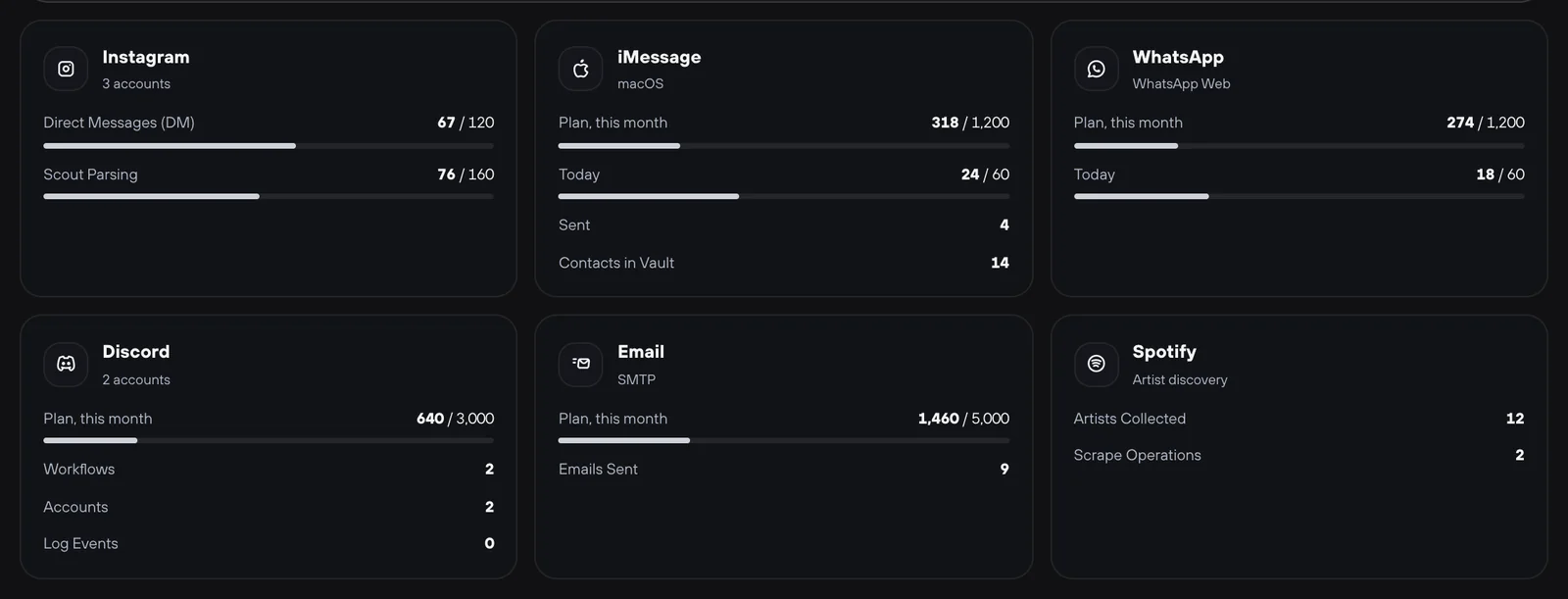
On the All Channels tab, each channel has its own card.
| Channel | What you see |
|---|---|
| Direct Messages (DM) and Scout Parsing (finding artists): how much is used and the limit | |
| iMessage | How many messages were sent and how many contacts you have. How much is used for Plan, this month and Today. You can send to 60 contacts a day at most. The caption shows where you send from: macOS or iPhone Bridge (sending through your iPhone) |
| How much is used this month and today. You can send to 60 numbers a day at most | |
| Discord | How much is used for Plan, this month. How many scenarios, accounts and log records you have |
| How much is used for Plan, this month and how many emails were sent | |
| Spotify | How many artists were collected and how many times you ran a search |
Labels on the cards:
- Inactive: you have not used the channel yet. For example, you have no Discord profile. The iMessage card always has this label on systems other than macOS.
- Not in plan: your plan does not include this channel. For example, iMessage and Discord on Individual.
The Spotify monthly limit counts different artists. It goes back to zero on the first day of the next month. You can also see what is left in the Spotify section itself.
Instagram Profiles tab
The Instagram Profiles tab shows usage for each profile. It is split into Outreach (first messages to artists) and ReachVerse (finding artists).
- Used today, marked "per profile": the daily limit of this profile.
- Used this month, marked "plan total": the shared counter for the month.
A profile can have a label:
- Limit reached: its daily or monthly limit is used up;
- Server unavailable: Verse could not get fresh data. Check your internet and click Refresh.
Sometimes one profile uses up its daily limit, but the others still have room. Then start the next sending from them.
On Premium and VIP, several profiles can work at the same time. Read more in Instagram profiles.
Read next
- Safe sending settingsPlan limits, pauses between messages, warm-up, proxies, how much to send at the start, and what to do if Instagram limits your account after a campaign.
- Instagram profiles: sign-in, proxies and warm-upHow to add an Instagram account to Verse: create a profile, add a proxy, sign in with a password or cookies, warm up for 48 hours, or use Dolphin Anty.
- How to message artists from your contact list (CRM)How to send a message to the artists you picked, right from your contact list: in one channel or in each artist's main channel, with a check of who gets it.
- Assistant and remindersHow the Verse assistant helps you use the app and answer artists, what it can do for you, how many messages you can send it, and how reminders work.
Something here doesn't match what you see in the app? Tell us and we'll fix the article.
Support