Your first Instagram campaign
How to add artists to your list, write a few versions of your message, set the pause between messages and start your first Instagram DM campaign in Verse.
- Updated
- October 17, 2026
- Reading time
- 5 min read
- Platforms
- macOSWindows
On this page
After this guide, your first Instagram campaign will be running. Verse opens the DMs of your account and messages every artist on your list. Only messages that Instagram really delivered go into the history.
Before you start, you need:
- at least one Instagram profile in Profiles. You must be signed in to it. How to create one: Instagram profiles;
- if you made the profile in VerseAnty (the Verse browser), it must be in Verse for 48 hours first. This is the warm-up. Profiles from Dolphin Anty, Multilogin and AdsPower do not need warm-up in Verse;
- a list of artists: usernames, @handles or profile links.
Add the artists
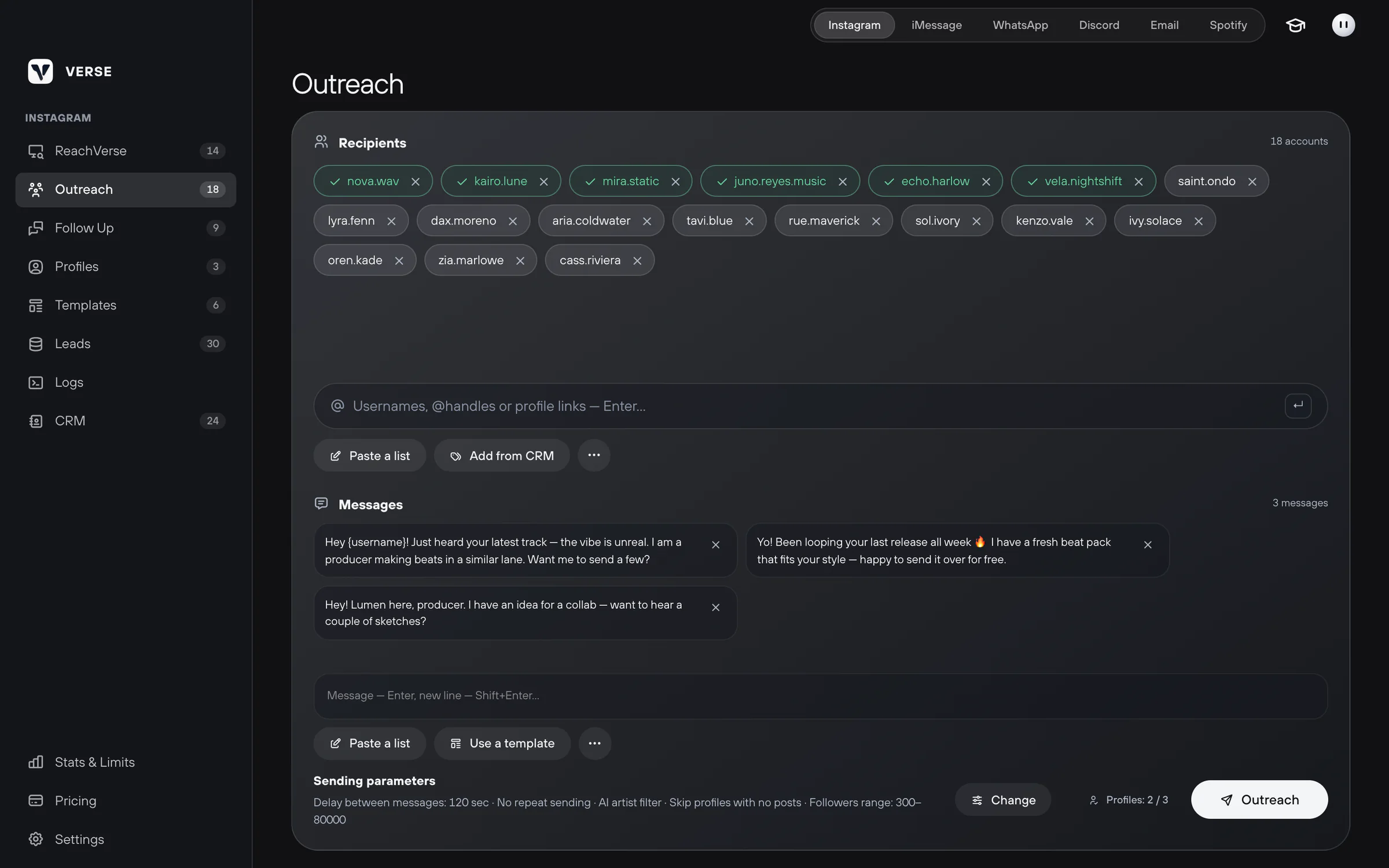
The Outreach section is where you send the first message to artists.
- Open Instagram in Verse. In the left menu, select Outreach.
- In the Recipients block, type an artist's username and press Enter. A username, an @handle or a profile link all work.
- To add many artists at once, click Paste a list. Paste one username per line. Verse removes repeats by itself.
- If the artists are already in your contact list, click Add from CRM. Pick the people you need.
Write a few versions of your message
Each artist gets one version, picked at random. Verse tries not to use the last two versions again. So messages sent one after another are not the same word for word.
- In the Messages block, write the text and press Enter.
- For a new line inside a message, press Shift + Enter.
- Add two or three more versions. Change the idea, not just one word. For example, offer a pack in one version and ask about the next release in another.
- To use the artist's username, put
{username}in the text. Verse replaces it with the username. - You can take ready texts from the library. Click Use a template.
A good first message is short. It names a real track by the artist and offers one clear next step. Examples and common mistakes: How to write first messages to artists.
Set the sending options
At the bottom of the screen there is a Sending parameters line. It shows your current settings. Click Change to open them.
| Setting | What it does |
|---|---|
| Delay between messages | How many seconds to wait between messages: from 5 to 3600. Verse changes each pause a little, by about 10–15 %. On the trial, the pause is at least 105 seconds |
| Skip already messaged | Skips people you already messaged from this computer. Turn it off only if you want to message the same people again |
| AI artist filter | AI looks at the profile bio, links and category. Verse messages only accounts that look like artists |
| Skip profiles with no posts | Does not message profiles with zero posts |
| Followers range | Messages only profiles with a follower count inside the range you set |
The rules in the DM List Rules block only remove some people from the list before sending. Do you want to message everyone? Turn these rules off.
Pick profiles and start
- Next to the sending options, you see how many profiles will work. For example, "Profiles: 1 / 3". You pick profiles in Profiles.
- Click Outreach.
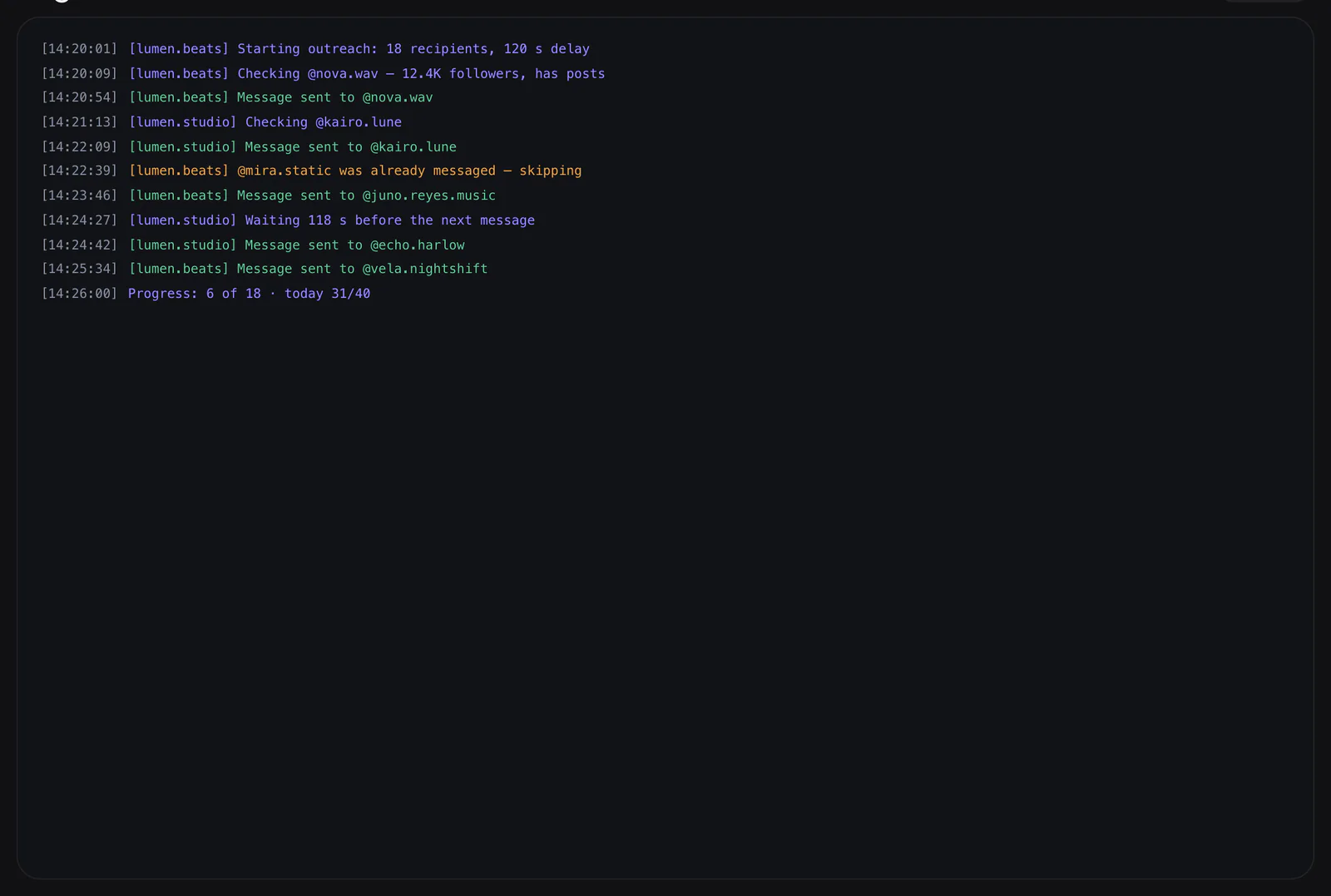
- Verse opens the profile's browser and starts writing. You can watch the progress in Logs, the record of every action. Errors show up there too, if Instagram did not accept a message.
- You can pause or stop the campaign. If Skip already messaged is on, next time Verse skips people who already got the message.
After the campaign
- Copy delivered copies the usernames of people who really got the message. You can move them into a follow-up, a second message for people who do not reply.
- Clean Sent removes people you do not need from the list. These are people you already messaged, profiles that were not found, private accounts, and accounts that did not pass the filters.
- The Stats & Limits screen shows how many messages you sent today. It also shows how many your plan still allows.
A few days later, write again to the people who did not reply. See Instagram follow-ups.
Read next
- Instagram profiles: sign-in, proxies and warm-upHow to add an Instagram account to Verse: create a profile, add a proxy, sign in with a password or cookies, warm up for 48 hours, or use Dolphin Anty.
- Follow-ups: second messages on InstagramHow to write again to people who did not reply: make a list of people who got your message, remove those who replied, add reminder texts and send them.
- Message templatesHow to save ready texts in the template library, put them into folders and add them to your Instagram, iMessage, Discord and WhatsApp campaigns in one click.
- Safe sending settingsPlan limits, pauses between messages, warm-up, proxies, how much to send at the start, and what to do if Instagram limits your account after a campaign.
Something here doesn't match what you see in the app? Tell us and we'll fix the article.
Support