Personal emails to artists with your beat pack attached.
Verse sends each artist a separate email from your own mailbox. The email has their name, one of your text versions and the beats. If the pack is too big for one email, Verse splits the files. They go out in several emails in the same thread.

- Platform
- macOS and Windows
- Sending
- Gmail with an app password, or any mailbox (SMTP)
- Plan
- Trial 50 · Individual 500 · Basic 2,000 · Premium 5,000 · VIP no limit, recipients a month
- Beat packs
- MP3, WAV or ZIP over several emails in one thread
Your beat pack is 60 MB, but one email takes 25 MB
Most email services allow about 25 MB per email. So a full pack does not send, or it turns into a cloud link the artist never opens. Sending it to 50 artists one by one, with a name in each email, takes all day. Verse plans how the files fit into emails. It sends each artist their own email and shows who got it.
How sending emails works
- 01
Connect your email
For Gmail, turn on 2-Step Verification and create a 16-letter app password. Your normal password will not work. For any other mailbox, enter its SMTP settings: host, port and SSL or TLS. SMTP settings are the details your email service gives for sending mail from other apps. If your provider blocks mail ports, add an SMTP proxy, a separate internet address for mail. Send a test email to check.
- 02
Add recipients, subject and text
Write one address per line. Or write Name <address>, so {name} has a name to fill in. Add from CRM takes addresses from the shared CRM, your list of every artist and deal. The subject is required. Write a few text versions. Each artist gets one, in a separate email with no CC or BCC.
- 03
Attach the beat pack
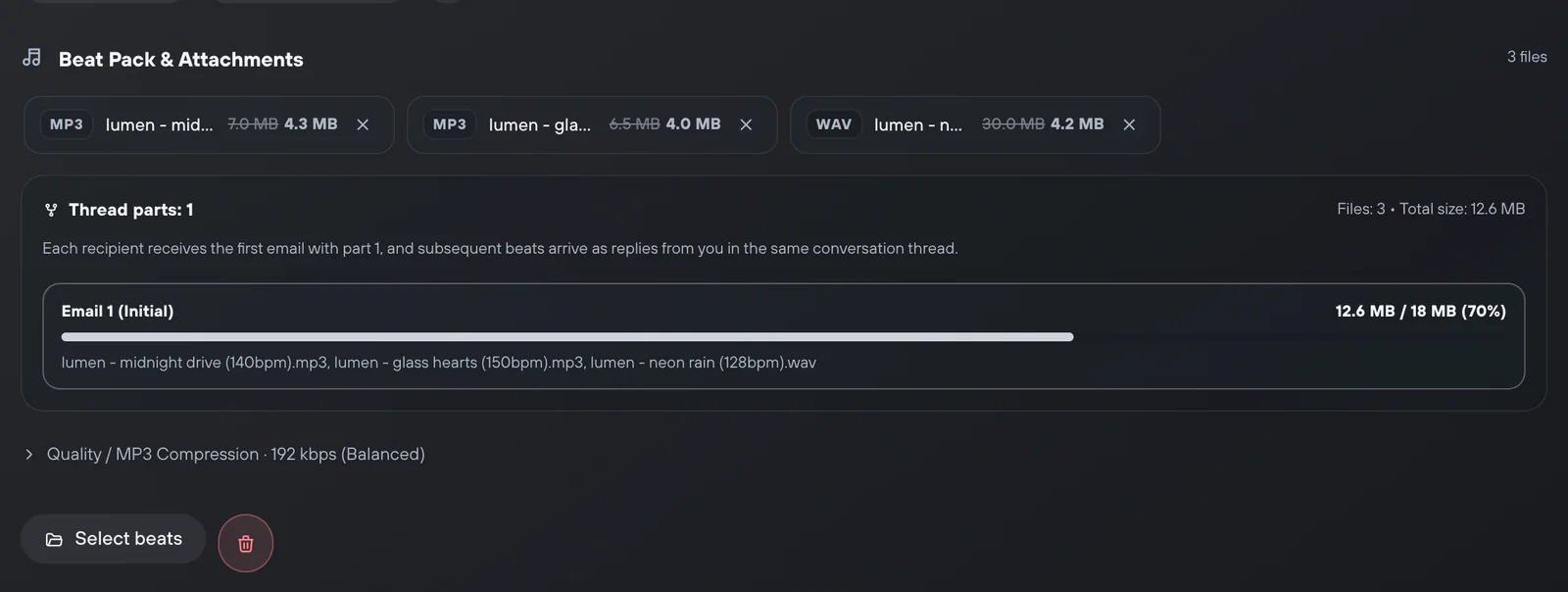
Choose MP3, WAV or ZIP files and a quality: Original, 192 kbps or 128 kbps. Only MP3 gets compressed, WAV never. Verse shows how many emails the files will need. Each email carries about 18 MB of whole files. The extra emails go as replies in one thread.
- 04
Send and check delivery
Set the pause between recipients, 40–189 seconds by default, and start. The delivery table shows a status for every address. You can copy the sent or failed ones. Or remove the sent ones before the next run.

What is already built in
Pack parts are free
Your plan counts recipients. Extra emails with the rest of the pack do not count toward the limit.
Daily limit for each mailbox
Each connected mailbox has its own daily limit, 300 by default. When it is reached, sending waits for the next day.
Clean address list
Verse removes repeated addresses. Before sending, it shows how many are ready and how many have errors.
Shared templates
Insert a saved text with Use a template. Save new ones for the other channels too.
Logs
Every connection, send and pause is saved in Logs. If an email fails, the error text is there too.
What to know before you start
- Gmail connects with an app password. You cannot sign in with your Google account.
- Verse never cuts one file into parts. A track bigger than about 18 MB needs MP3 compression or a cloud link.
- Sending works only while Verse is open.
- Verse cannot promise your email lands in the inbox. Your email service's limits and spam filters still apply.
The short answers.
Why do I need a Gmail app password?
Google does not let other apps send mail with your normal password. An app password is a separate 16-letter code. You create it in your Google account after you turn on 2-Step Verification.
Can I use Outlook, Yandex or my own domain?
Yes, through Custom SMTP, if the mailbox allows sending from other apps (SMTP access). For your own domain, set up SPF, DKIM and DMARC records. These domain settings help your emails stay out of spam.
My pack is 60 MB. What will the artist get?
First, an email with your text and the first files. Then replies in the same thread with the rest. Each email carries about 18 MB of whole files.
Do the extra pack emails count toward my limit?
No. The limit counts recipients: 50 on the trial and 500 a month on Individual. Basic has 2,000, Premium 5,000, and VIP has no plan limit.
Can the subject be left empty?
No, sending will not start without a subject. You can use {name} in it.