
Email still works well for sending beats. Managers and artists often put an email address in their bio for business offers. An email does not get lost in message requests. And you can attach files right away.
There are downsides too. People do not open an email with an unclear subject. An 80 MB pack will not send at all. Gmail and most mail services limit one email to about 25 MB.
Below you will learn where to get addresses and how to write the subject and text. You will also see what to attach and how Verse sends beat packs.
Where to get addresses
When you write to an artist for the first time, only use addresses that they or their team posted themselves. For example, in the Instagram bio, on a website or in a YouTube channel description.
ReachVerse, the Verse tool for finding artists, finds these addresses. If a bio has an email, it goes into the Email column of Leads. This is the table of artists you found. The Only with contacts option keeps only those artists.
How to set up the search: How to find artists who fit your beats.
Another good source is artists you already talk to in DMs or on Discord. Write to them: "Send me your email, and I'll send the WAVs." Now the artist is waiting for your email. These emails get opened most often.
The subject line
The subject decides if the email gets opened. The artist's inbox is full of other mail. There are emails from their distributor, promoters and a dozen other producers. Subjects with details work best:
- "3 beats for your sound, 140–150 BPM, melodic trap"
- "A beat like 'glass hearts', dark pads, 128 BPM"
- "The pack we talked about in DMs: Lumen"
Empty subjects do not work: "Beats", "Collab", "Hey!!!". Anything that looks like mass mail does not work either. That means caps lock, exclamation marks and the word "free".
In Verse the subject is required. A campaign will not start without it. You can write {name} in the subject, and Verse puts the artist's name there. A subject with the artist's name stands out.
The email text
Keep the text shorter than you think. The artist opens the email to listen to beats.
- Their name and one line about their track.
- Who you are: name and genre.
- What is attached: how many beats, tempo, key or mood.
- Terms in one line: lease or exclusive, where to see prices.
- One question or next step.
An example:
Hey {name},
Listened to "glass hearts". The vocal on the second verse sits really well on that guitar loop. I'm Lumen, I make melodic trap and R&B.
Attached are three beats in a similar mood: 140, 145 and 150 BPM. All are available for lease. We can talk about exclusives.
If you like one, tell me. I'll send an untagged version and stems.
Lumen
Write two or three versions of the text. Verse sends each person one of them. So emails in the same campaign are not exactly the same.
What to attach
How many beats
Three to five beats picked for one artist's sound work better than a folder of twenty. A big pack looks like you sent it to everyone. People often save it "for later".
If you have a lot of beats, split them into packs by mood. Send different packs to different artists.
Format and file names
For a first email, tagged MP3s are usually enough. Send WAVs and stems when the artist is interested or has bought a licence.
Name files so that a month later the artist knows what they are and who sent them. For example: lumen - midnight drive (140bpm).mp3. A file called "beat_final_v3.mp3" gets lost in a downloads folder.
How to get past the 25 MB limit
Gmail will not send an email with more than 25 MB of attachments. Three WAV files can easily weigh more. You have three options:
- compress the MP3s;
- send a cloud link;
- spread the files across several emails.
Verse does the last one for you.
In Beat Pack & Attachments you pick MP3, WAV or ZIP files. Verse spreads whole files across emails, about 18 MB of files per email. This leaves extra room under the limit.
The first email goes out with your text and the first group of files. The rest arrive as replies from you in the same thread. The artist sees one conversation.
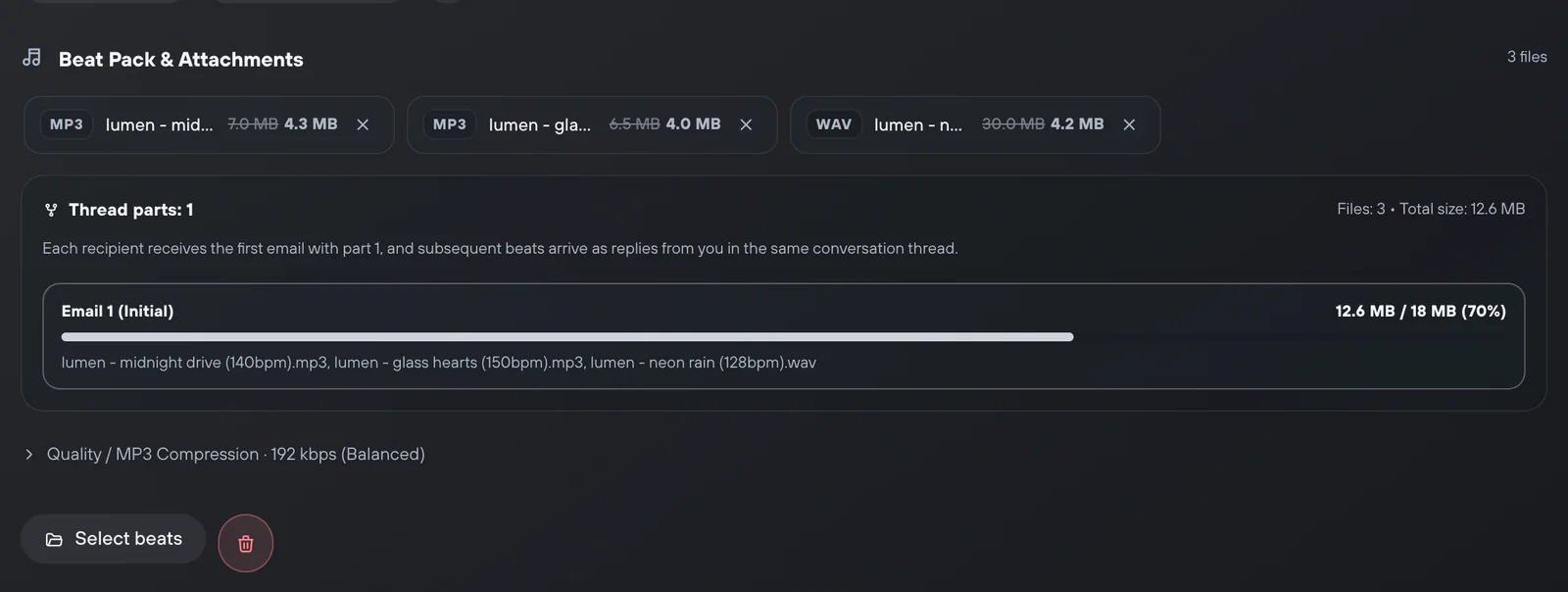
Verse never cuts one file into parts. If a track is bigger than about 18 MB, pick a Quality / MP3 Compression preset. Choose 192 kbps (Balanced) or 128 kbps (Compact). Compression works only for MP3. WAV files always keep full quality. For very large WAVs or stems, a cloud link is safer.
Sending through Gmail: the app password
Verse sends emails from your own mailbox. To do this, it connects to the mail server (over SMTP). Gmail needs an app password. Your normal account password will not work.
- In your Google Account, open Security and turn on 2-Step Verification.
- Open App passwords, type the name "Verse" and click Create.
- Google shows a 16-character code. Copy all of it.
- In Verse, open the Email workspace. Under Sender accounts, click Add Email and choose Google (Gmail).
- Paste your Gmail address into Email address and the code into App password. Then click Verify and save.
- Send a Test email to yourself and check how it looks.
If your email uses your own domain, choose Custom SMTP. Enter the host, port, login and password. The port is usually 465 with SSL or 587 with TLS.
Each mailbox has its own Daily email limit: how many emails it can send per day. The full guide with proxy setup and error fixes is in Email campaigns and beat packs.
Sending speed and limits
Every person on your list gets a separate email. Verse waits between emails. You set how long in Delay between recipients.
Do not try to send fast. Mail services watch how much a new mailbox sends. Many emails at once from a newly connected Gmail look suspicious. Start with small groups.
Your plan limit counts recipients. The replies with the rest of a beat pack do not count.
| Plan | Recipients per month |
|---|---|
| Free (trial) | 50 |
| Individual | 500 |
| Basic | 2,000 |
| Premium | 5,000 |
| VIP | unlimited |
Campaigns run while Verse is open.
After sending
The delivery table shows the status of each email. Copy Sent gives you the addresses that got the email. Copy Failed shows which addresses to check.
Move the artists you emailed into your contact list (CRM). This is one table with every artist and deal. Set a Next action about a week later: "ask if they listened to the pack". Listening to files takes time, so asking the next day is too soon.
How to plan your second message: Follow-up messages for selling beats.
A beat email gets opened when:
- the subject says what is inside;
- the text is five lines long;
- the files were picked for that artist.
Verse takes care of file size, splitting the pack across emails and pauses between them. Your job is to choose who gets which beats.