
Instagram shows how an artist presents themselves. Spotify shows what they release and who listens. For a producer, this is useful.
On Spotify you can see three things right away:
- if the artist has new releases;
- how big the artist is;
- which cities their listeners are in.
The official links on the profile often include their Instagram. There you can write to them.
This post shows how to search for artists on Spotify. You will learn to read listeners and cities. Then you will see how to message the artists you found.
One thing first: you can't message artists on Spotify, and Verse sends nothing there. In Verse, Spotify is only for finding artists. Messages go out through Instagram, email and the other channels.
Why use Spotify and not just Instagram
Searching on Instagram has a weak spot. Music pages post artists, bloggers and memes. And the number of followers says little about the music.
Spotify answers the questions that matter before your first message:
- Is the artist releasing music? Do they have releases from the last few months? Then they are active. They may need beats for the next track.
- How big are they? Monthly listeners show how many people really play their music.
- Where do people listen? Cities tell you the language, country and time zone.
- Who is similar to them? Spotify shows similar artists. You see who else makes the same kind of music.
Where to start
Start the same way as in any artist search. Pick two or three example artists. Choose artists whose recent releases you could make beats for.
In Verse, open the Spotify part of the app and go to Artist discovery. Type a search.
Three kinds of search work:
- an artist name or link. With an artist link, Verse looks for similar artists;
- a playlist link. Verse goes through the playlist tracks and lists their artists. Use Spotify and curator playlists in your genre. They already have similar artists in one place;
- a text search by genre or mood, for example "melodic trap" or "European rap".
Next, add similar artists to your list. Related / Radio on an artist row finds similar artists. It uses the Related and Radio lists on Spotify.
You can also search from several artists at once. Tick them and click Similar. Verse uses up to 15 ticked artists. In a couple of minutes, three artists turn into a list of dozens of names in the same style.
Collect the data
At first, search shows only basic details. To see listeners, cities and social links, click Collect data. You can click it in three places:
- on an artist row, for one artist;
- on the selection bar, for the ticked artists;
- above the table, for the whole list.
A big list is collected in a queue. You can stop it and continue later.
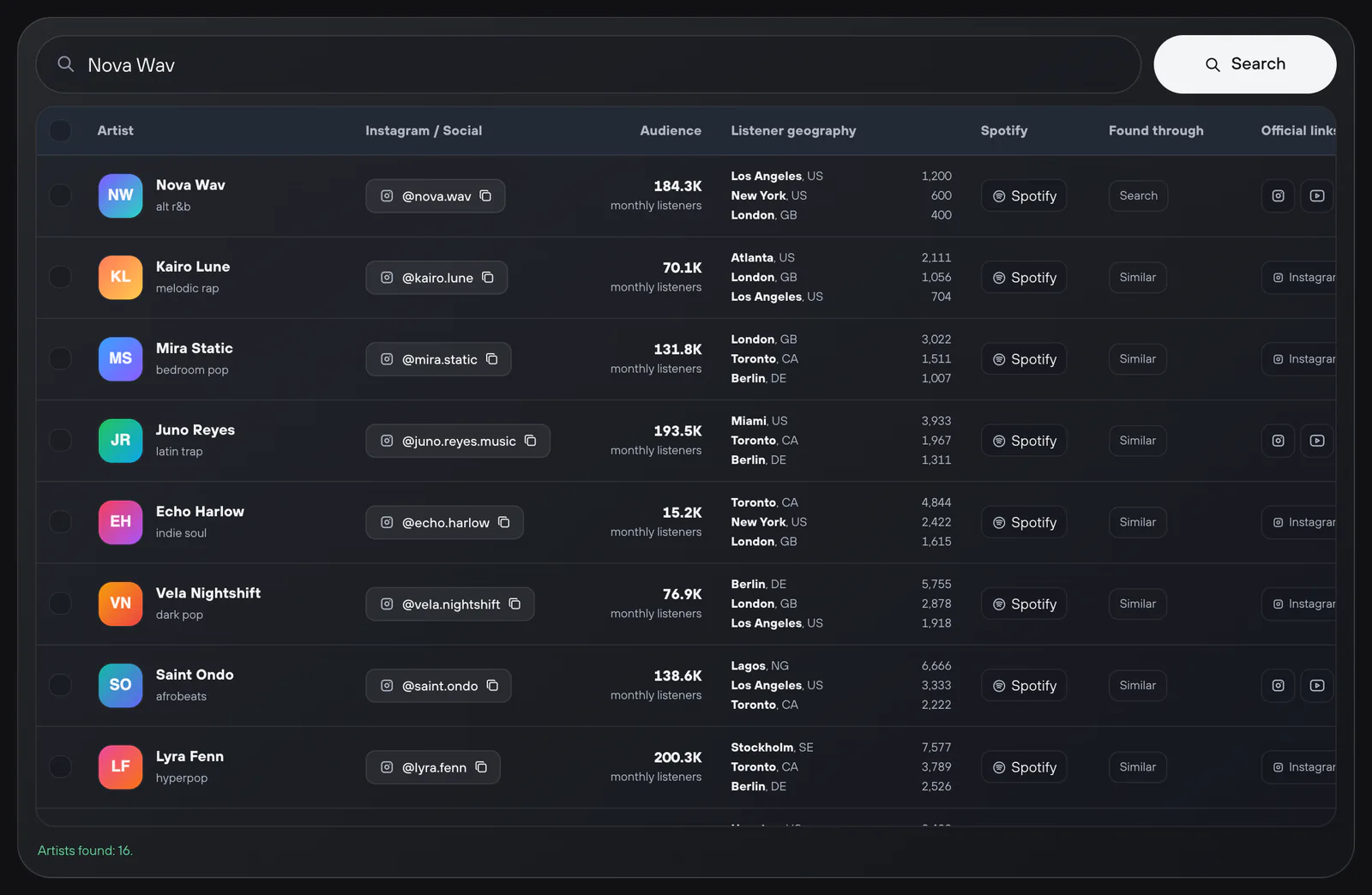
Spotify doesn't give all details for every artist. Some artists have no listener cities. Verse finds an Instagram only if the artist added it to the official links on their profile.
How to read monthly listeners
Monthly listeners help you find artists at your level. There is no right number, but there is a simple logic:
- Does the artist have a few thousand listeners? They usually answer messages themselves and look for their sound. They are open to leasing beats. For a producer without big credits, these artists are the easiest start.
- Does the artist have tens or hundreds of thousands of listeners? They usually work with a team already. You can still write, but your message must be stronger. A manager will probably answer.
- The number alone says nothing about quality. A small artist with regular releases can be worth more. Compare them with an artist who has one viral track from two years ago.
In Verse, the Monthly listeners filter has ready ranges. You can also set a Custom range. Start with artists you can really help. When replies come in, make the range wider.
Cities and regions
Listener geography shows where people play an artist the most. The region filter keeps artists who are most played in one region. The regions are the CIS, Europe, North America, Latin America and Asia.
This helps in three ways:
- message language. An artist from Berlin with most listeners in Germany may prefer English or German;
- send time. Does your message arrive at 4 a.m. their time? When they wake up, it will be far down in their inbox;
- style. Do you make Latin trap? Filter by Latin America, and the list gets shorter right away.
Note: if Verse has no city data for an artist, the region filter hides them.
How to go from Spotify to a message
From Spotify you have the artist, their number of listeners and an Instagram link. Next steps:
- Turn on Only with Instagram. Only the artists you can write to stay in the list.
- Check each artist quickly. Listen to 30 seconds of the latest release. Find a detail to mention in your message. The full checklist is in How to find artists who actually fit your beats.
- Tick the right artists and click To CRM. The CRM is your shared contact list: one table with every artist. Only artists with an Instagram go there. Verse skips the rest and tells you how many.
- To send DMs, copy the usernames with Copy Instagram. Paste them into Outreach, the section for first messages to new artists. To learn how to write that message, read How music producers can message artists on Instagram.
Do you need an email or phone number from the bio? Paste the usernames into ReachVerse's Direct profile check. Verse opens each profile and saves the contacts the artist listed.
Do you want to use the list outside Verse? Use Export CSV in the More actions menu.
Limits and connection
Spotify search has a monthly limit. It counts the different artists Verse found for you in a calendar month. If the same artist shows up again, it doesn't use the limit.
| Plan | Different artists per month |
|---|---|
| Free (trial) | 100 |
| Individual | 300 |
| Basic | 1,000 |
| Premium | 5,000 |
| VIP | 10,000 |
By default, search runs through the Shared Verse server. You don't need to set anything up.
Do you want to use your own Spotify session? Set it up under My Spotify.
Saved artists stay in Artist library on your computer. You can open them even after the monthly limit runs out. Read more in Finding artists on Spotify.
Spotify shows who really releases music in your style and who listens to it. Instagram and email are where you start the talk. First pick artists by releases, listeners and cities. Then write to them. This way your list is shorter and more accurate.